Madison Genthry
Most people guess their typing speed wrong. They either think they’re painfully slow or quietly assume they’re somewhere near the top, and the real number usually lands in a far more ordinary spot. That’s not bad news. Typing speed is one of the few work skills you can measure in sixty seconds and improve in a few weeks, so knowing where you actually stand is the first useful step.
Below is what the largest typing datasets say about “normal” in 2026, what employers expect, and the practice habits that move the needle.
What the Biggest Typing Studies Say About the Average Speed
The most cited research comes from Aalto University and the University of Cambridge. Their team analyzed 136 million keystrokes from 168,000 volunteers and found an average of 52 words per minute, with the fastest participants hitting about 120 WPM (Aalto University, 2018). The full paper puts the mean at 51.56 WPM with an uncorrected error rate of roughly 1.2%.
Newer test-site data paints a slightly lower picture, which makes sense. People who sign up for a university study tend to be confident typists. Open typing tests catch everyone.
Ratatype looked at 506,024 tests and found the median sits between 30 and 40 WPM, so “normal” is roughly 35 WPM (Ratatype, April 2026). TypeLit’s 2026 data from more than 30,000 users came out at a mean of 51.8 WPM, with 29.9% of typists above 60 WPM and only 1.3% above 100.
Where Most Typists Actually Land
Here’s how Ratatype’s half-million tests break down. If you’re in the 30 to 50 WPM band, you’re in good company.
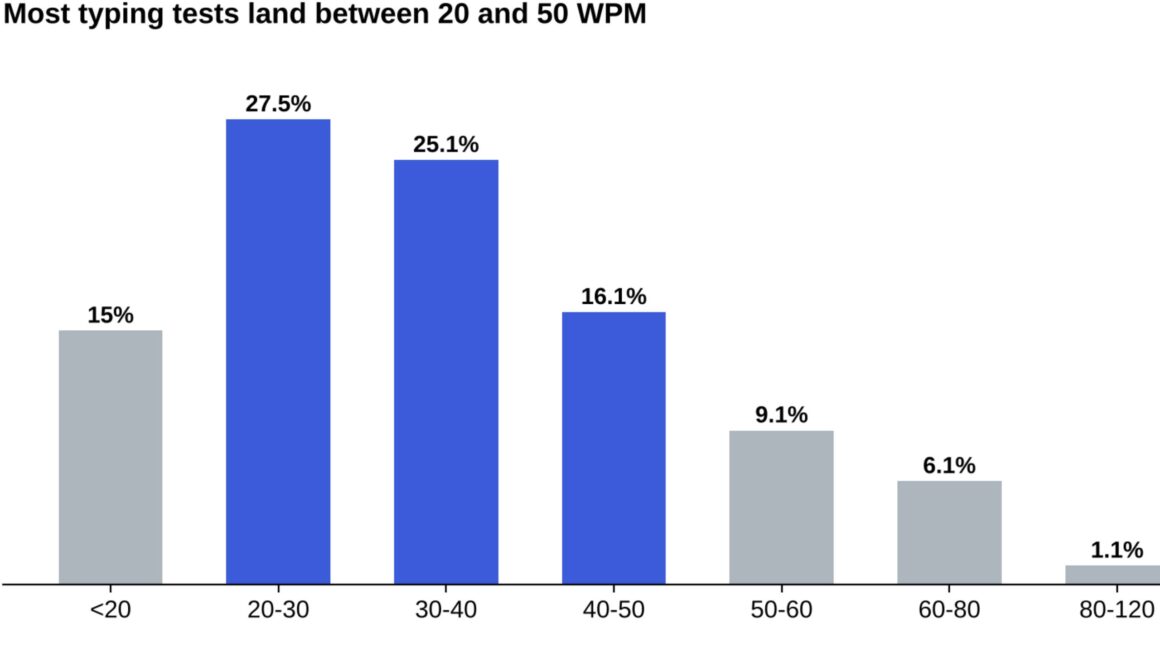
Notice how quickly the bars shrink past 60 WPM. Only about 7% of tests landed at 60 or above, which is why 60 is often called “fast” and 80 is treated as advanced.
How Fast You Need to Type for Work
For most jobs, the bar is lower than people fear. A U.S. Army secretary posting on USAJOBS defines a qualified typist as someone who can type 40 words per minute over a five-minute sample with three or fewer errors (USAJOBS, 2024). Data entry roles usually ask for 40 to 45 WPM with 95% accuracy or better (TypeQuicker, 2026).
Writers, developers, and support agents don’t usually face a formal test, but speed still shows up in their day. A support agent replying to 60 tickets, or a content writer pushing out a 1,300-word draft, feels every extra minute.
One small but useful detail: a “word” in WPM is standardized to five characters, including spaces and punctuation. So long words don’t punish you, and short words don’t flatter you.
Phone Typing Versus Keyboard Typing
Thumbs are catching up. A separate Aalto study of more than 37,000 volunteers found two-thumb phone typing averaged 38 WPM, only about 25% slower than a physical keyboard (Aalto University, 2019). Younger users between 10 and 19 typed around 10 WPM faster than people in their 40s.
Why Some People Type So Much Faster Than Others
The Aalto team’s most interesting finding wasn’t the average. It was the habit that separated fast typists from everyone else: rollover. That means pressing the next key before releasing the previous one. Fast typists used rollover on 40 to 70% of their keystrokes, whether or not they touch typed, and it correlated strongly with speed.
The researchers also found that having taken a typing course made surprisingly little difference. What mattered more was practice volume and a smooth, overlapping rhythm.
TypeLit’s numbers back this up. Users who had typed more than 1,000 pages averaged 72.7 WPM, compared with 44.7 WPM for people who had typed only one to five pages (TypeLit, 2026). That’s a gap of 28 words a minute, built almost entirely on repetition.
A Practical Plan to Improve Your Typing Speed
You don’t need an expensive course. You need short, consistent sessions and a willingness to slow down before you speed up.
Put accuracy ahead of speed
Every error costs you a backspace, a correction, and a broken rhythm. Most trainers suggest staying at 95% accuracy or higher, and only pushing pace once your error rate stays low across several sessions.
Practice 10 to 20 minutes a day
Short daily blocks beat a two-hour weekend marathon. Your fingers learn patterns through repetition, and fatigue in long sessions tends to bake in bad habits.
Learn home row properly
Even though Aalto found that some fast typists don’t use textbook touch typing, almost all of them stop looking at the keyboard. Keep your eyes on the screen and let your fingers find their way back to F and J.
Type real text, not random words
Random word drills help, but real sentences with punctuation, capitals, and numbers are what you type at work. Copy a paragraph from a book or article you like and type it out at the end of each session.
Retest once a week
Daily testing creates noise. A weekly check gives you a cleaner picture of progress and keeps you from getting discouraged by an off day.
Habits That Keep Typists Stuck at the Same Speed
Plenty of people practice for months and barely move. Usually it comes down to one of a few habits.
Chasing speed on every test
If every session is an all-out sprint, you rehearse your mistakes as much as your keystrokes. Alternate fast days with deliberately slow, accurate days.
Glancing down at the keys
Each glance breaks your rhythm and costs a fraction of a second. It adds up over a page. A cheap fix is to cover your hands with a light cloth for a few sessions.
Ignoring posture and setup
A keyboard set too high or a laptop on the sofa forces awkward wrist angles, and tense hands are slow hands. Sit with your forearms roughly level and your wrists relaxed.
Practicing only on a phone
Thumb typing is a different skill. Aalto’s 2019 numbers show phones still trail keyboards by about 25%, so keyboard gains have to come from keyboard practice.
When Speed Isn’t the Real Bottleneck
Here’s the honest part. Going from 45 to 65 WPM is a real gain, but for a lot of people the bigger time sink isn’t typing speed at all. It’s retyping. Moving notes from paper into a doc, transferring a draft from one platform to another, re-entering the same text into forms that block pasting.
For that kind of repetitive transfer, a tool can help more than another month of drills. Phrasly’s human auto typer is a Chrome extension that types text you’ve already written into Google Docs, Slides, and web forms at a speed you choose, anywhere from 30 to 240 WPM. It adds natural pauses and occasional corrected typos, so the result looks like ordinary typing rather than a block of pasted text. It’s handy for presentation demos, screen recordings, and editors that mangle pasted formatting.
If you’re working on the writing side as well, Phrasly’s free word counter is useful for checking length targets while you practice with real text, and the Phrasly blog covers writing tools and AI detection in plain language.
Typing Speed Benchmarks at a Glance
To keep things simple, here’s how the numbers stack up:
- Under 30 WPM: below average, worth a few weeks of practice
- 35 to 40 WPM: typical for the general public (Ratatype, 2026)
- 40 to 45 WPM: the usual minimum for office and data entry jobs
- 52 WPM: average among study volunteers (Aalto University, 2018)
- 60 to 80 WPM: fast, reached by roughly 7% of test takers
- 100 WPM and up: rare, about 1.3% of TypeLit users
And for perspective on the far end, Guinness World Records lists Stella Pajunas typing 216 words in a minute on an IBM electric typewriter back in 1946. Nobody needs that for a job.
Know Your Number, Then Raise It
The data is reassuring. Most people type somewhere between 35 and 52 WPM, the standard workplace bar is about 40, and the habits that make people faster are simple: accuracy first, short daily practice, and a lot of real-world typing. Measure yourself today, practice for a few weeks, and measure again. You’ll almost certainly see progress, and you’ll know exactly where your time is going, whether that’s slow keystrokes or the kind of retyping a tool can take off your plate.