Madison Genthry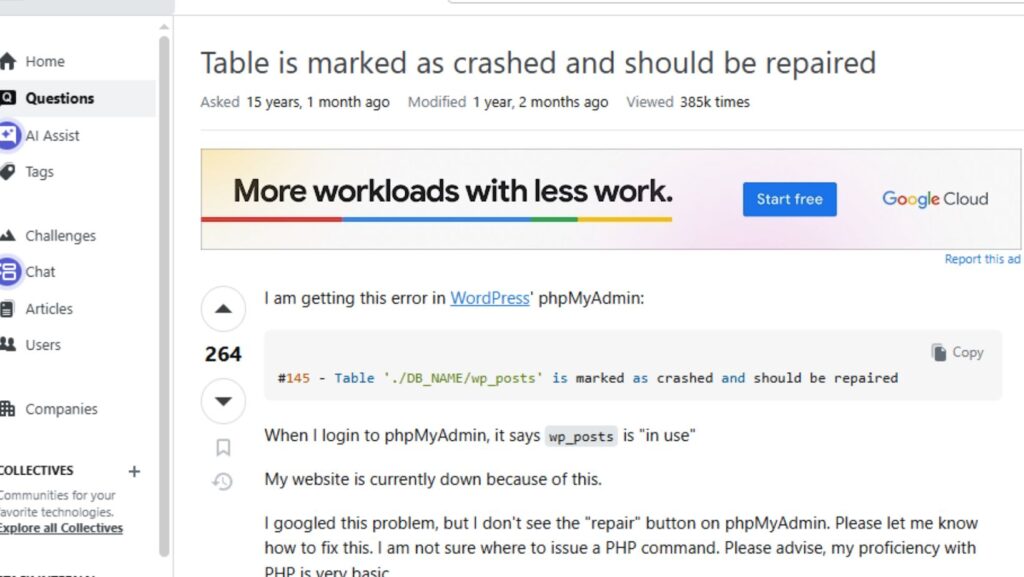
The “Table is marked as crashed and should be repaired” error occurs when MySQL detects corruption in the data or index files in the table. One of the examples of the user queries related to this MyISAM table error is the following:
When this error occurs, it makes the table unreadable. In PhpMyAdmin, as in the example, the table is locked, and when you try to log in to PhpMyAdmin, it will show that the table is “in use”. In this post, we will show the tested troubleshooting methods to resolve this error. To quickly repair and restore the MySQL tables, you can use a professional MySQL repair tool.
Causes of “MySQL Table is Marked as Crashed and should be repaired” error
Some of the reasons of this MyISAM table-based error are below:
- Low disk space on the system hosting the MySQL tables.
- Heavy load on the server.
- Corruption in MySQL table.
- MySQL database is damaged or corrupted.
- Improper shutdown of MySQL Server.
- Improperly closing the tables while using the databases.
Methods to resolve MySQL Table is marked as crashed:
First check and ensure there is enough disk space available on the drive where MySQL tables are saved. To check this, right-click on the drive and then click Properties. If space is low, then free up some space. If it does not resolve the issue then follow the below troubleshooting methods.
Method 1: Restore Backup File
If you have a readable and updated backup of the MySQL database, then you can easily restore the crashed MySQL tables from the backup. If the binary log files are enabled then you can perform point-in-time recovery in MySQL. To check and view binary log files, use mysqlbinlog utility. If the binary log files are not enabled then you can use the mysqldump utility to restore the MySQL database from the dump file. To perform this, follow the steps below:
- First check you have all required permissions on the dump files. Especially, verify SELECT, SHOW VIEW, CREATE, and TRIGGERS privileges. Also, check that the connection option is selected on the server.
- Next, create an empty database to save the restored database using the following command:
mysql > CREATE DATABASE db_name;
- After this, use the mysqldump utility to restore the database. To do so, use the following command:
mysql -u root -p db_name < dump.sql
- This will restore all the objects in database.
Limitations
- Restoring a large-sized file using mysqldump utility is a time-consuming process as it runs statements one by one.
- Requires a complete and readable backup (dump) file
- It can cause restore issues if you’re restoring dumps from MySQL version to another due to syntax or feature differences
- Does not support specific object recovery
Method 2-Use PhpMyAdmin tool
You can also use the PhpMyAdmin tool to repair MyISAM tables. It is an open-source tool that you can use to repair and restore MySQL databases. It can help you resolve corruption and index issues in MyISAM tables.
To use this tool, follow the steps below:
- Open the phpMyAdmin tool.
Note:You can access phpMyAdmin using XAMPP application for Windows, clicking on the URL, or using the cPanel.
- On the phpMyAdmin tool home page, click on Databases.
- Under the Databases, you will see a list of all the MySQL databases.
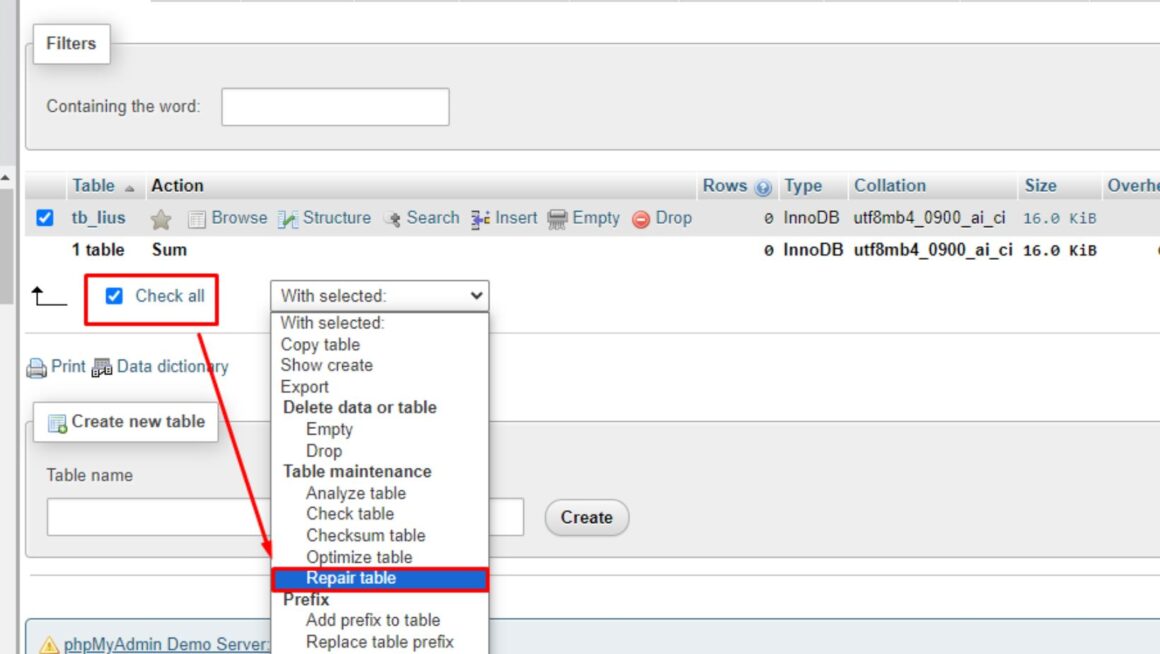
- Click on the affected or corrupted database. This will open a list of all the tables in MySQL database. Select the table for example wp_posts, that you want to repair in the MySQL database.
- Click on the With selected dropdown button and then select the Repair Table option.
- This will start repairing the MySQL tables. Once the repair process is completed, you will see a message indicating that the database tables have been repaired successfully.
Limitations:
- It can resolve only minor corruption issues in MyISAM tables.
- To restore large-sized tables, you may face time-out issues.
- It allows repairing a single database at one time.
- It does not support specific object recovery.
Method 3-Use myisamchk Command
If the database you’re trying to repair does not contain partitioned tables then you can use the myisamchk utility. To repair the MySQL database tables using this utility, following are the steps:
- To run this command you should make sure that no other program is using the table. For this, stop the MySQL Server using the below command.
service mysql stop
- Then, recover the table by executing the below command:
myisamchk –recover TABLE
- Next, start the MySQL Server by using the below command:
service mysql start
Limitations
- This command doesn’t support repairing of partitioned tables.
- It requires you to stop MySQL server
Method 4- Use a professional MySQL repair tool
If none of the above methods helps you repair or restore the MyISAM tables, opt for professional MySQL repair tools. The Stellar Repair for MySQL is one such tool that can help fix many issues in the MySQL database. It can rebuild severely corrupted indexes in the database with no file size limitations. You can quickly repair large-sized MySQL database files with complete integrity. Also, the tool helps you perform specific object recovery and allows you preview the recovered data before saving.
Conclusion
With the above post, you have learned how to resolve MySQL table is marked as crashed error. You can restore a backup or repair MyISAM tables using PhpMyAdmin or the myisamchk utility. But they all have some limitations and restrictions. The best method to get rid of corruption errors and regain access to the MySQL database table in less time is to use a professional MySQL repair tool.